
Apple Pencil Wavy Lines After a Screen Replacement – Why It Happens and How We Fix It
By Mike · Bristol iPad Repair
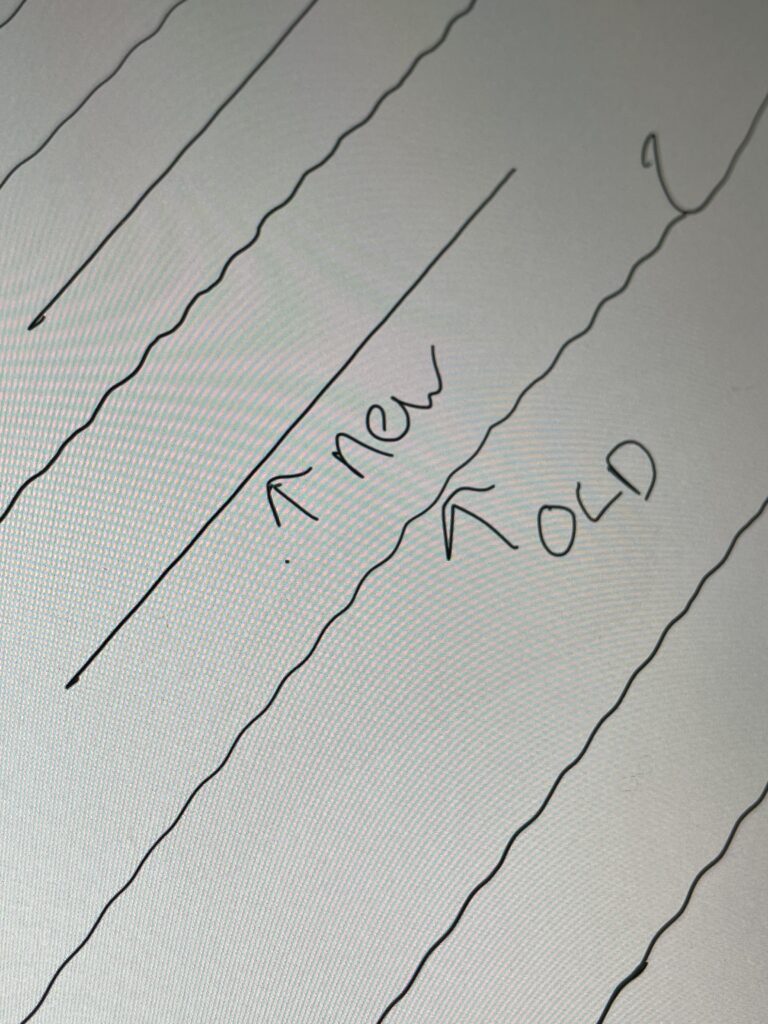
Have you had your iPad screen replaced, and now your Apple Pencil won't draw straight lines? You drag a ruler-straight stroke and get a wobbly, wavy or jittery line instead. This is a known problem after a screen replacement on the iPad Air 4, iPad Air 5 and iPad Pro 11" 3rd Gen and newer. The good news is that it can be fixed.
At Bristol iPad Repair we copy the serial number from your original screen to the new screen during the repair. Your Apple Pencil then draws as smoothly and accurately as it did the day you bought the iPad.

Why does my Apple Pencil draw wavy lines?
Every iPad screen leaves the factory with its touch sensor carefully calibrated to work with the Apple Pencil. That calibration lets the iPad read exactly where the pencil tip is and how hard you're pressing, which is what gives you clean, straight lines when you draw or write.
The calibration is tied to the screen's serial number. When a new screen goes in, the iPad doesn't recognise its serial number. It can't apply the correct touch sensor calibration, so the Apple Pencil's position is read slightly wrong. Those small errors show up as wavy lines, especially when you draw slowly or use a ruler.
The fix: copying the screen serial number
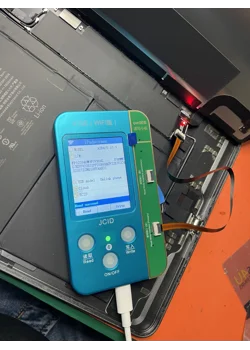
Software is now available that lets a technician transfer the original screen's serial number onto the replacement screen. The iPad then treats the new screen as if it were the original. The touch sensor calibration stays correct and the Apple Pencil works properly again.
How we do it
- Read the original serial number. Before the old screen comes off, we read and save its serial number.
- Replace the screen. We fit your new iPad screen.
- Write the serial number to the new screen. Using the software, we write the original serial number onto the replacement screen.
- Check the calibration. The iPad now recognises the screen and applies the correct calibration. We test it by drawing straight lines with an Apple Pencil before handing it back.
Which iPads are affected?
- iPad Air 4
- iPad Air 5
- iPad Pro 11" 3rd Gen and newer
The result
Because the original serial number is carried over to the new screen, the touch sensor and Apple Pencil calibration are preserved. You get smooth, straight lines with no wobble or jitter, just like with the original screen. Whether you sketch, take handwritten notes or mark up documents, your Apple Pencil will behave exactly as it should.
Frequently asked questions
Can wavy Apple Pencil lines be fixed after another shop replaced my screen?
Often, yes. If the original screen or its serial number is still available, the serial number can be written to the new screen. Get in touch and we'll tell you what's possible for your iPad.
Is it a problem with my Apple Pencil?
Almost never. If the wavy lines started straight after a screen replacement, the cause is the screen's touch sensor calibration, not the Apple Pencil.
Do you copy the serial number on every iPad screen replacement?
Yes. On the affected models it's a standard part of every iPad screen replacement we do, so you won't get wavy lines in the first place.
Need an iPad screen replacement in Bristol?
Bristol iPad Repair is a fully mobile service. We come to your home or workplace and repair your iPad in our van, with the screen serial number copied over so your Apple Pencil draws straight lines.
Call or WhatsApp 07528 654654